
Audiophile music player for Mac
Dkompos is a free music player for Apple Silicon Macs, made for people with large local libraries and a good DAC. It checks the path from each file to your DAC while you listen, and only says bit-perfect when nothing along the way has changed the audio.
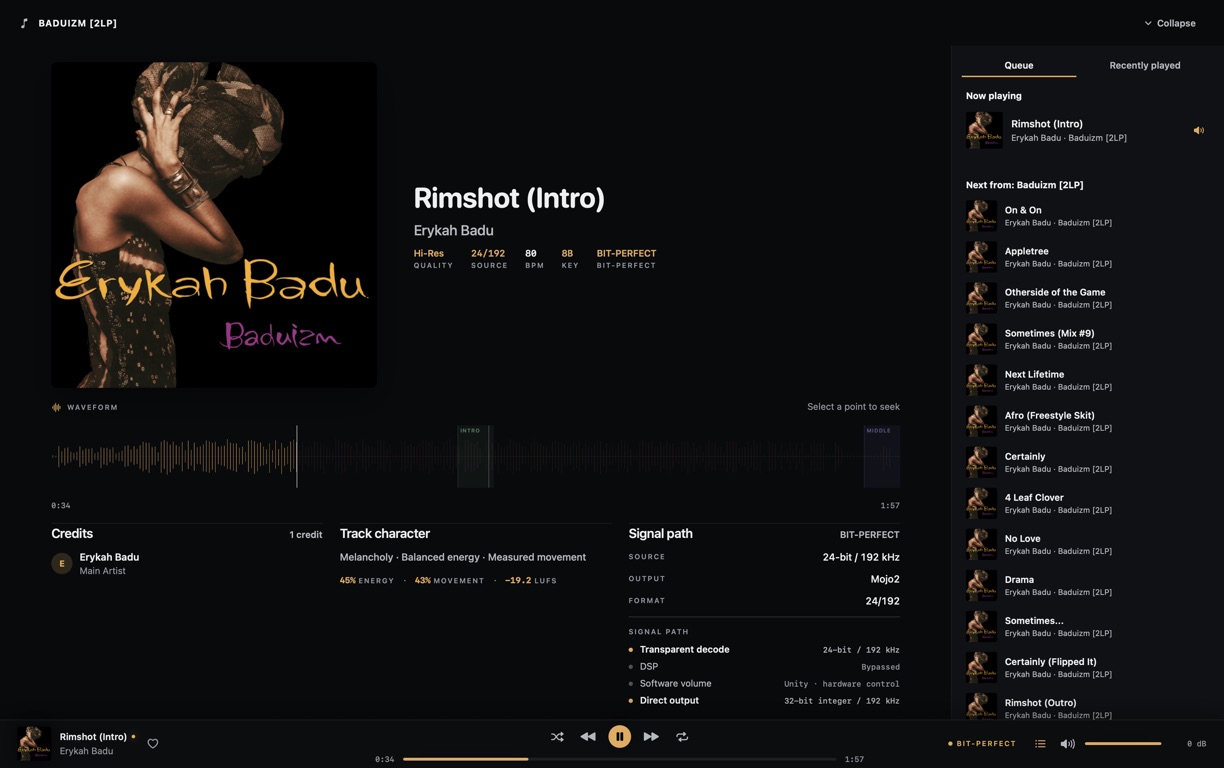
The badge is based on what's reaching your DAC right now, whatever the file says.
See which device is playing and the exact format it's being sent.
Built from folders you choose, with no account and no upload.
Signed and notarised, with no subscription.
What it takes to be bit-perfect
A 24-bit FLAC isn't bit-perfect just because it's a 24-bit FLAC. EQ, app volume, resampling or a shared output can all change the samples on the way out. Dkompos checks each step and shows you the result while it plays.
When the badge appears
Dkompos shows bit-perfect only when a 16-bit or 24-bit stereo lossless file is playing at its own sample rate through a direct CoreAudio output, with effects and app volume bypassed. If anything in that chain changes mid-track, the badge goes away.
- Source
- Format · Bit depth · Sample rate
- Path
- Decode · Effects · Volume · Output
- Checked
- Device · Format · Route · Dropouts
16-bit or 24-bit stereo lossless
Plays at the file's own sample rate through a direct CoreAudio output, with effects and app volume bypassed. You set the volume on your DAC or amp.
MP3 at its own sample rate
Decoded once, with no effects, resampling or app volume. It's never called bit-perfect, because MP3 is lossy to begin with.
EQ, crossfeed, ReplayGain, app volume or resampling
Plays through Dkompos's high-quality processed path, and the signal path shows which of these is switched on.
DSD, DSF and DFF
Converted to PCM for playback. Dkompos doesn't output native DSD.
Browse by album, or by resolution
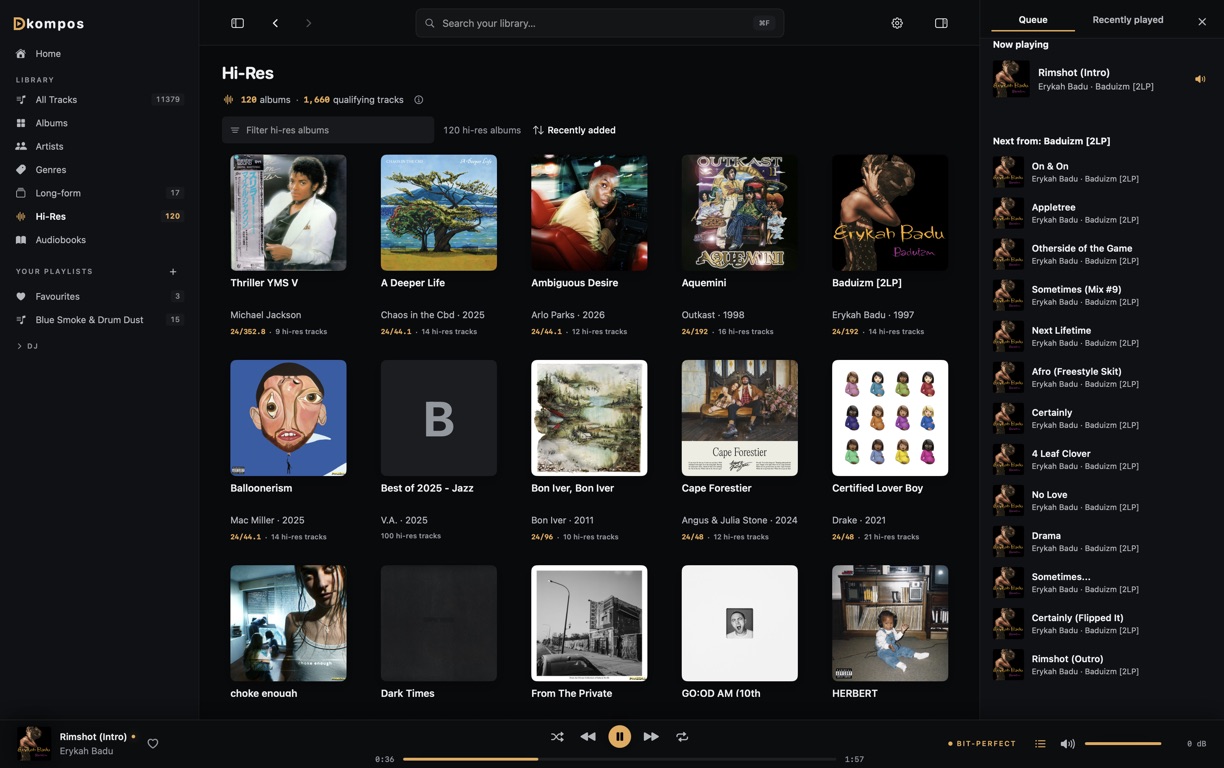
Choose your music folders and Dkompos builds the library: albums, artists, genres, playlists, favourites and a Hi-Res view. The quality label on an album describes the file. The badge in the player describes what's actually playing.
- Browse
- Albums · Artists · Genres · Playlists
- Quality
- Lossless · Lossless 24 · Hi-Res
- Search
- Across the whole library
Your library stays on your Mac
There's no account to create. Your music, library and listening history are stored on your Mac, and this website never sees any of it. The only things that go online are artist lookups and optional lyrics lookups, and you can switch both off.
What goes online and what doesn'tAudio questions
Not covered here? Email hello@dkompos.com.
Is Dkompos bit-perfect?
When your setup allows it. Dkompos shows bit-perfect for 16-bit or 24-bit stereo lossless files playing at their own sample rate, through a direct CoreAudio output, with effects and app volume bypassed. If anything in that chain changes, the badge goes away.
Can I use Dkompos with an external DAC?
Yes. Now Playing shows the output device, the format being sent to it, and whether the path to it is bit-perfect.
Does EQ or ReplayGain break bit-perfect?
Yes. EQ, crossfeed, ReplayGain, resampling and app volume all change the samples, so those tracks are labelled Processed. Turn them off and use your DAC's volume control to get back to bit-perfect.
Does Dkompos output native DSD?
No. DSD, DSF and DFF files are converted to PCM and labelled Converted.
Does Dkompos replace a streaming service?
No. It plays music files you already have, from folders you choose.
Which Macs can run it?
Apple Silicon Macs running macOS 14.2 or later. There's no Intel build.
Will macOS let me open it?
Yes. The DMG is signed with an Apple Developer ID and notarised by Apple, so macOS treats it like any other app from an identified developer. Its SHA-256 checksum is on the Releases page.
Try it with your own library and DAC
Download the DMG, open it and drag Dkompos to Applications. There's no account or subscription.